A long reading assignment can make it hard to know where to begin. You open a 40-page PDF, start highlighting, and soon realize that your notes may end up nearly as long as the chapter itself. Even after an hour of work, the main argument can still feel unclear.
Creating a textbook chapter summary gives you a more manageable starting point. Instead of trying to remember every sentence, you identify the chapter’s central ideas, important definitions, supporting arguments, and conclusions. With an AI summarization tool, you can complete that first pass quickly and spend more of your time understanding the material.
This does not mean skipping the reading or avoiding the work. The aim is to make the work count by separating the initial search for key information from the deeper tasks of analysis, interpretation, and review.
The old approach: highlighting without understanding
The familiar approach often follows the same pattern: read a paragraph, realize you did not absorb it, read it again, and highlight a sentence that seems important. Then repeat the process across the entire chapter.
By the end, the page may be covered in yellow, but the highlights do not necessarily show how the ideas fit together. Your notes may also reproduce so much of the original wording that reviewing them takes almost as long as rereading the chapter.
The problem is not that highlighting is always useless. The problem is relying on it as the main form of study. Copying or marking sentences can become passive work. You are recording what the author wrote, but you may not be deciding which ideas matter, how the argument develops, or what you need to remember.
A better process starts by reducing the chapter to its core structure. Once you can see that structure, you can return to the original text with clearer questions and a better sense of what deserves your attention.

How to create a textbook chapter summary with AtomAI
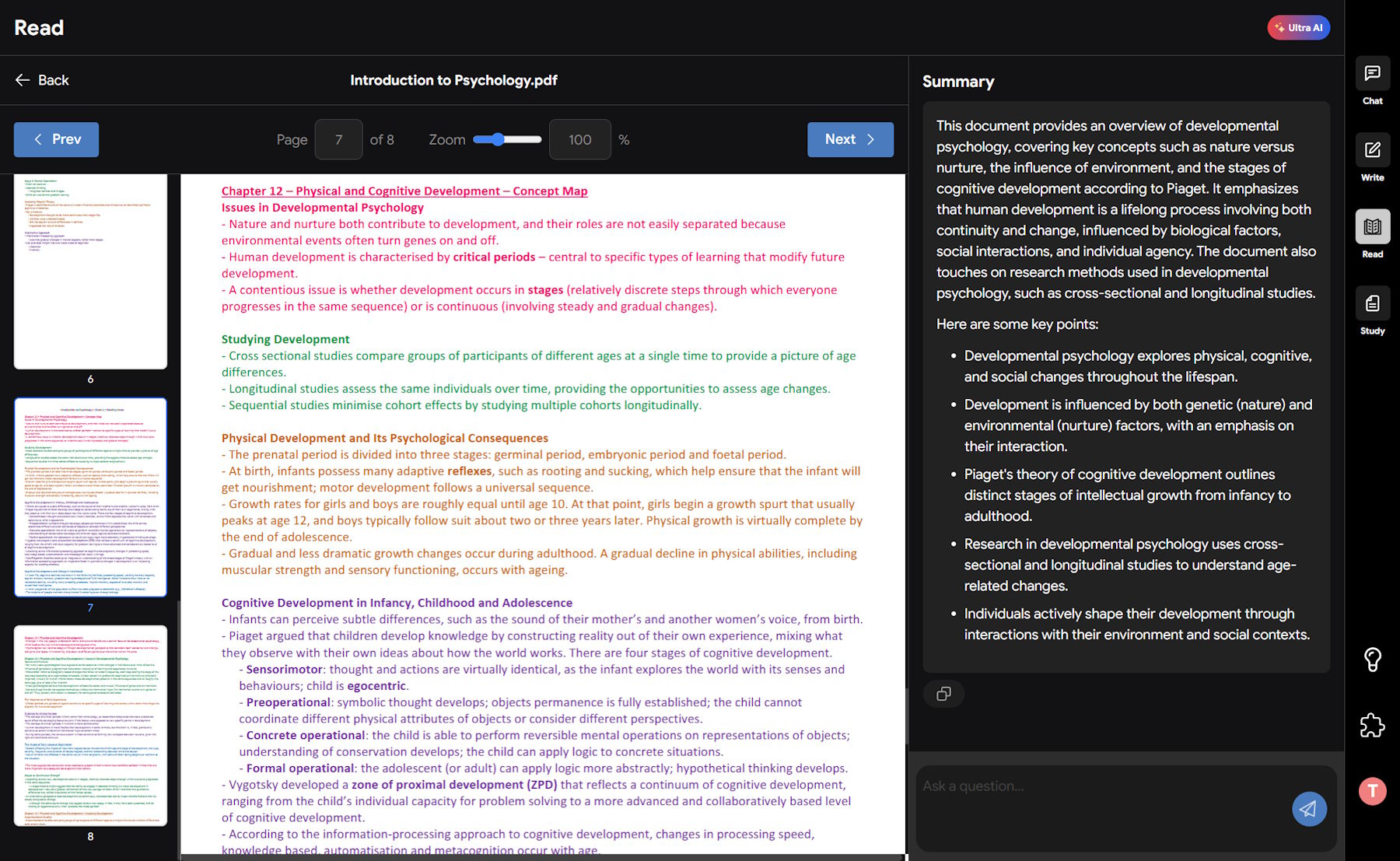
AtomAI’s Read feature acts as a PDF summarizer. It handles the initial pass through a document and presents the main information in a shorter, easier-to-review format. For a chapter that would normally take an hour to work through manually, the summary itself can be generated in about 30 seconds, letting you grasp the core concepts in less than five minutes.
The process has two steps. You upload the document, then generate the summary. From there, you decide what needs closer reading, further explanation, or more detailed notes.
This is not a replacement for learning the material. It is a way to reach the useful part of the study process sooner. Instead of spending most of your time searching for the chapter’s main idea, you can focus on understanding it, testing it against the supporting details, and connecting it to the rest of your course.
The two-step summarizing process
- Step 1: Upload your document Download the PDF from your course portal and upload it to the AtomAI Read feature. The document could be a scanned textbook chapter, a long academic journal article, or a historical source. The tool can handle each of these document types.
- Step 2: Generate the summary With one click, AtomAI reads the document and identifies its key arguments, definitions, and conclusions. It organizes that information in a clean format with bullet points, so you do not have to search through blocks of dense text just to find the main idea.
Move beyond the initial summary
A summary is useful for getting oriented, but it is not always enough for an exam, assignment, or essay. You may need the exact definition of a term, evidence for a particular argument, or a simpler explanation of a difficult concept.
Once the document is uploaded, you can ask questions about the PDF. AtomAI scans the text for relevant information and provides an answer based on the document, often with a reference showing where the information appears in the original. This lets you move between the condensed summary and the full chapter without repeatedly searching through every page.
For example, if you are reviewing a psychology chapter, you could ask, “What is the definition of cognitive dissonance according to this text?” If you are gathering evidence for an essay, you could ask, “What are three arguments the author makes against industrialization?” If a theory is difficult to follow, you could ask, “Explain the author’s theory of relativity in simpler terms.”
These questions make the chapter more interactive. Rather than simply accepting the generated summary, you can examine individual claims, clarify unfamiliar language, and locate details that matter for your assignment. The tool has already processed the document, so you can ask targeted questions instead of searching manually through the whole chapter.
Use the summary as a starting point for active reading
Effective reading involves more than moving from the first page to the last. After reviewing your textbook chapter summary, return to the sections that contain the most important arguments or the concepts you find hardest to understand.
The summary can show you what the chapter covers, while your questions help you investigate specific details. You can check definitions against the original wording, review the evidence behind an argument, and see how the author reaches a conclusion. This gives you more time for higher-level thinking, analysis, and synthesis rather than simple transcription.
It also helps you avoid treating every sentence as equally important. A chapter may contain examples, background information, definitions, claims, and conclusions. Seeing the main structure first makes it easier to decide which passages deserve a close read and which ones provide supporting context.
If you want more guidance on engaging with a text rather than passively highlighting it, UNC’s Learning Center offers a guide to active reading strategies. The central idea fits this process: use the summary to orient yourself, then interact with the original material through questions and careful review.
Upload your first PDF to AtomAI to generate a concise summary and start asking questions about the document. Try AtomAI free
The traditional cycle of rereading, highlighting, and copying notes can take a long time without giving you a clear understanding of the chapter. A PDF summarizer makes the first stage more efficient by identifying the key arguments, definitions, and conclusions for you.
From there, the real study work begins. Review the textbook chapter summary, ask focused questions, return to important passages, and use the original document to confirm details. This approach helps you move beyond passive transcription and put your time into understanding, analysis, and preparation for essays or exams.