Hey everyone! Every image AtomAI makes for you is now drawn by GPT Image 2.5 Sunburst, the newest and most detailed image model from OpenAI. Ask for a picture in Chat and that is the model behind it. There is nothing to switch on.
What Sunburst is
OpenAI released two image models together this month. Flare is the fast one; Sunburst is the one built for detail and precision, taking a little longer over each picture in exchange. For a diagram you are going to revise from, detail is the right trade, so that is the one we chose.
OpenAI says the 2.5 models improve on GPT Image 2 in natural lighting, richer textures, recognising the subjects in reference photos, and following instructions closely, including across several rounds of changes.
Side by side
Here is the same request given to both models at the settings AtomAI uses: a labelled cross-section of the human heart, with eight labels spelled out in the prompt.
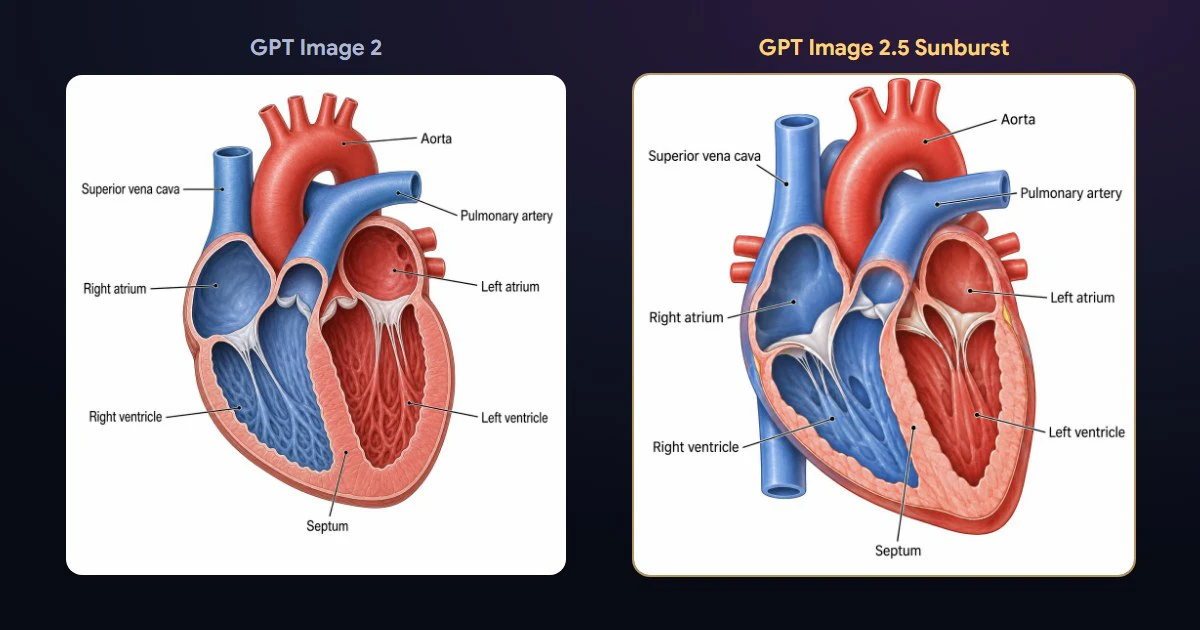
Both get the labels right on this one. The difference is in the drawing: in this pair, Sunburst gives the chambers and vessels more depth and shading.
Better diagrams from a better prompt
Alongside the new model, we changed how AtomAI writes the prompt it sends. Because Sunburst follows detailed instructions closely, the assistant now passes on everything you asked for: the style, the layout, and for a labelled diagram, every label spelled exactly and where it should point. If you ask for "a labelled diagram of a plant cell with the organelles we covered", that is what gets drawn.
A flowchart, timeline or mind map is still better as a diagram in the canvas, where you can edit the boxes afterwards. Image generation is for pictures: an illustration for a presentation, a labelled drawing to revise from, a poster.
What you need to do
Nothing. Image generation is part of Premium, with the same monthly allowance as before. Ask for an image in Chat, the way you always have.
You can read more about GPT Image 2.5 in OpenAI's announcement here.